Securing a Hajj visa is the dream of a lifetime for millions. Once you have completed your application through the official channels—whether via the Nusuk Hajj platform or an authorized travel agent—the next crucial step is verification. In the digital age, you no longer need to wonder if your visa is ready; you can confirm it yourself in minutes.
This guide provides a clear, human-friendly walkthrough on how to navigate the official Saudi Ministry of Foreign Affairs (MOFA) platforms to check, verify, and download your Hajj visa for the 2026 season.
Why You Must Verify Your Hajj Visa Personally
The Saudi government has streamlined the pilgrimage process significantly. However, because Hajj involves significant financial and emotional investment, manual verification is your best defense against potential clerical errors or unauthorized agents.
By checking your status online, you ensure:
- Data Accuracy: Your name and passport number match your official documents.
- Validity: The visa is active and recognized by the Saudi border authorities.
- Peace of Mind: You can travel with confidence, knowing your paperwork is digitally logged.
Phase 1: Accessing the Official MOFA Portal
The primary gateway for all Saudi visa inquiries is the Ministry of Foreign Affairs (MOFA) platform.
1. Visit the Official Website
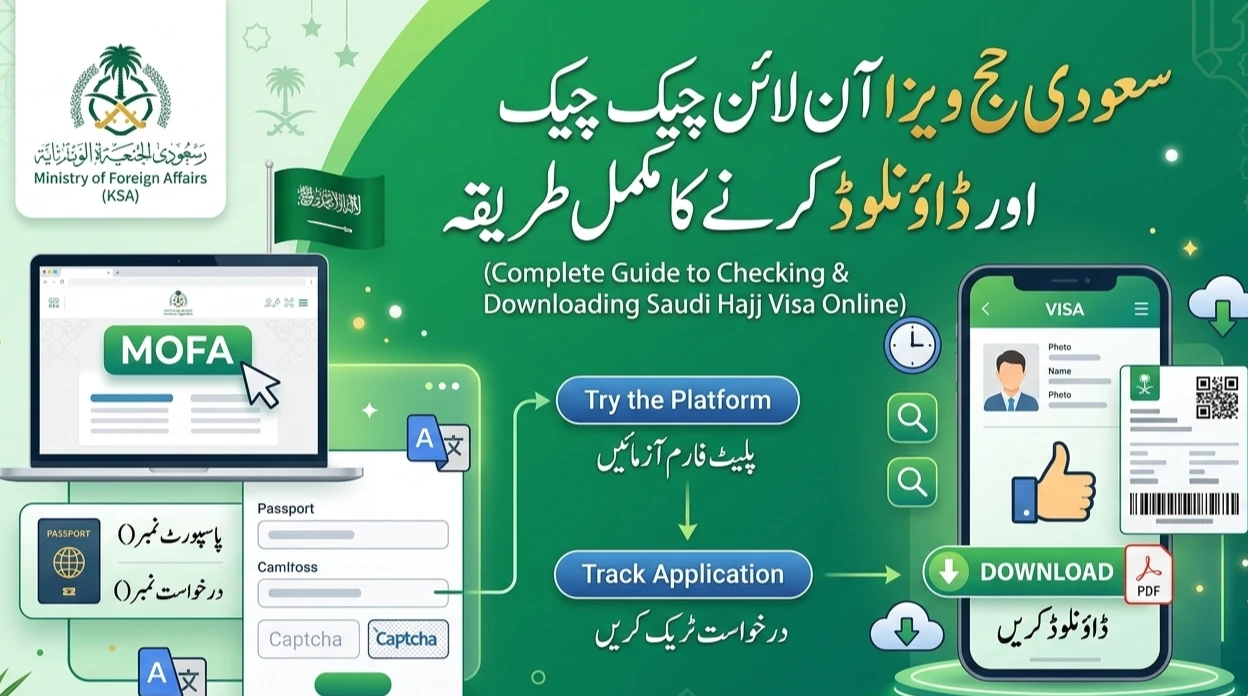
Start by navigating to https://visa.mofa.gov.sa. This is the “Enjaz” portal, which handles the bulk of visa processing data.
2. Overcoming the Language Barrier
When you first land on the page, the default language is Arabic. If you aren’t fluent, don’t worry. Most modern browsers (like Google Chrome or Safari) offer a “Translate” feature. Look for the “A/文” icon in the address bar or right-click anywhere on the page and select “Translate to English.”

Alternatively, many official Saudi pages have a small “E” or “English” toggle button at the top right of the header.
Phase 2: Running Your Initial Visa Inquiry
Before you can download the final PDF, you need to find your record in the massive Saudi database. Follow these specific steps:
1. Locate the Inquiry Section
On the homepage, you will see a search box or an “Inquiry” (Istifsaar) module. You want to look for the “Query” section, usually located toward the bottom or side of the main landing page.
2. Select the Search Criteria
In the “Query Type” dropdown menu, you have a few choices. For Hajj pilgrims, the most effective method is usually searching by “Application Number” or “Visa Number” combined with your “Passport Number.”
3. Enter Your Details Carefully
Input the following information into the form:
- Application Number: This is the number provided when you first submitted your Hajj request.
- Passport Number: Ensure there are no spaces between the letters and digits.
- Captcha Code: Type the random numbers shown in the image to prove you aren’t a bot.
4. Hit “Inquire” or “Search”
Once you click the button, the system will refresh. If your visa has been issued, a summary page will appear showing your basic details, photo, and visa status.
Phase 3: Transitioning to the “Platform” for Download
Sometimes, the initial inquiry page only shows a “status” but doesn’t give you the full, printable document. To get the official PDF, you may need to move to the main service platform.
1. Click “Try the Platform”
Look for a prominent button labeled “Try the Platform” or “Go to Services Portal.” This takes you to the newer version of the MOFA site which is designed for document retrieval.
2. Use the “Track Application” Feature
On this new interface, look for a service titled “Track My Application.” This is specifically designed for users who want a deep dive into their specific file.
3. Re-enter Your Credentials
You will likely be asked to provide your Application Number and Passport Number one more time. This is a security measure to ensure you are the rightful owner of the data.
Phase 4: Downloading and Printing Your Hajj Visa
Once you are inside the “Track Application” results page, you will see a comprehensive view of your visa. This includes your visa type (Hajj), the duration of stay, and the issuing consulate.
1. Locate the Download/Print Icon
Scroll to the bottom of the page. You should see a button labeled “Download” or a printer icon.
2. Save as PDF
When the print dialog opens, instead of sending it directly to a printer, select “Save as PDF” from the destination menu. This gives you a digital copy you can store on your phone or email to yourself.
3. Print Multiple Hard Copies
It is a “best practice” for Hajj pilgrims to keep at least three physical copies:
- One in your carry-on bag.
- One in your checked luggage.
- One left at home with your family.
Essential Tips for a Smooth Experience
- Browser Choice: The MOFA website often performs best on Google Chrome or Microsoft Edge. If the page isn’t loading, try clearing your browser cache.
- Wait Times: During peak Hajj season, these websites handle millions of hits. If the site is slow or returns an error, wait 30 minutes and try again.
- Name Matching: Don’t panic if the English spelling on the portal is slightly different from your passport (e.g., “Mohammad” vs “Muhammed”). As long as the Passport Number is 100% correct, you are usually fine.
- Check the Expiry: Double-check the “Valid Until” date. Hajj visas have specific entry and exit windows that are strictly enforced.
Frequently Asked Questions (FAQs)
What should I do if my visa doesn’t show up?
If the system says “No record found,” first check your typing. If it’s still missing, contact your Hajj agent or the Nusuk platform. It may simply be that the visa is still in the “Processing” stage and hasn’t been uploaded to the public portal yet.
Is the online PDF copy valid for travel?
Yes. The Saudi authorities use e-visas. The PDF you download contains a barcode or QR code that immigration officers scan at the airport. You do not need a physical sticker in your passport.
Do I have to pay to check my visa status?
No. Checking your visa status on the official MOFA website is a completely free service. Avoid any third-party websites that ask for a fee to “track” your visa.
Can I check my Hajj visa status on a mobile phone?
Absolutely. The MOFA website is mobile-responsive. However, downloading and saving the PDF is often easier on a desktop computer.
Final Thoughts
The journey of Hajj is a spiritual milestone. By taking ten minutes to verify your visa online via the MOFA portal, you remove a major layer of stress from your travel preparations. Always ensure you are using the official .gov.sa links to keep your personal data secure.
Safe travels on your journey to the Holy Cities!