The education landscape in Khyber Pakhtunkhwa is undergoing a massive digital shift. For years, teachers and school staff faced a slow, manual process when they needed to move to a different station. That era is officially over.
Under the leadership of Chief Minister Muhammad Sohail Afridi, the KP government has launched the e-Transfer Policy 2026. This isn’t just a new website; it is a complete overhaul of how merit and transparency work in the Elementary and Secondary Education Department (KPESE).
If you are a teacher looking to move closer to home or seeking a new professional environment, this guide will walk you through everything you need to know. We will break down the rules, the technical steps, and the “merit first” approach that defines this new system.
Understanding the Vision: Why “Digital First”?
The main goal of the 2026 policy is to remove human interference. In the past, manual transfers often led to complaints about favoritism. By moving everything to an online portal, the government ensures that every transfer is backed by data.

The system is designed to benefit two groups: the teachers and the students. Teachers get a fair shot at a station that fits their personal needs. Meanwhile, schools stay properly staffed because the system prevents “over-staffing” in popular areas while rural schools are left empty.
Are You Eligible? The 2026 Criteria
Before you log in to the portal, you must make sure you meet the basic requirements. The 2026 policy has set specific “tenure” rules to ensure stability in schools.
1. The Two-Year Rule
Generally, any regular employee of the education department must complete at least two years of continuous service at their current school before they can request a transfer. This rule helps students have a consistent learning experience with the same teacher for at least a full two-year cycle.

2. Rules for Ad-hoc Teachers
If you are working on an ad-hoc basis, the requirements are slightly stricter. You must have at least three years of service before you become eligible for the e-transfer system.
3. School Staffing Levels
The portal will automatically block transfer requests from schools that are already facing a shortage of teachers. If your departure would leave a subject or a grade without a teacher, the system will prioritize the students’ needs and may restrict your application until a replacement is available.

The Technical Prerequisite: HRMIS and iEMIS Verification
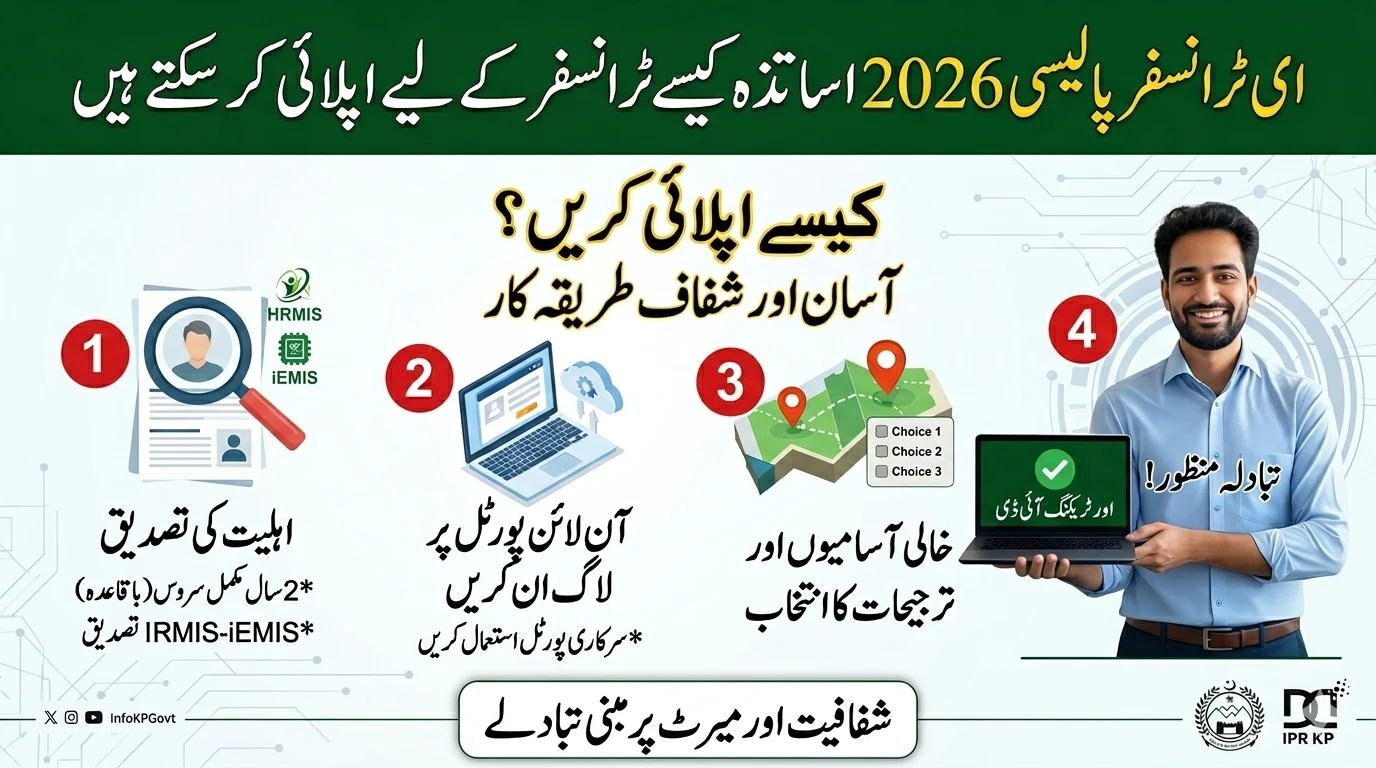
You cannot apply for a transfer if the government doesn’t know exactly who you are and where you are currently posted. This is where the HRMIS (Human Resource Management Information System) and iEMIS come into play.
Your digital profile is the “soul” of your application. Before the transfer window opens, you must:
- Log in to your account and check your personal details.
- Ensure your current designation and school code are correct.
- Check that your joining date and previous service history are updated.
- Crucial Step: Your profile must be “Verified” by the relevant office. An unverified profile will result in an automatic rejection by the e-transfer software.
Step-by-Step Guide to Applying Online
Once you have confirmed your eligibility and verified your profile, follow these steps to submit your application.
Step 1: Access the Official Portal
The government has centralized all applications through the e-Transfer Plus Portal. Avoid using third-party links or unofficial apps. Always use the official KPESE website or the dedicated mobile application provided by the department.
Step 2: Browse Vacant Positions
The new system is “vacancy-led.” This means you can only apply for a post that is actually empty. The portal provides a real-time list of vacant positions across different districts and circles. You can filter these by:
- District and Tehsil
- Gender (Male/Female schools)
- Subject specialty (e.g., Biology, Maths, Primary)
Step 3: Select Your Preferences
The 2026 policy allows you to choose up to three preferred stations.
- Choice 1: Your most desired school.
- Choice 2 & 3: Backup options. The system will try to place you in your first choice based on your merit score. If that spot is taken by someone with a higher score, the system automatically looks at your second and third choices.
Step 4: Review and Submit
Double-check your choices. Once you hit the submit button, you cannot change your preferences for that month’s cycle. The system will generate a tracking ID for your application.
How the Merit Scoring System Works
This is the most important part of the 2026 reforms. Decisions aren’t made by a person; they are made by an algorithm. Your “Score” is calculated based on several factors:
- Seniority: Your total length of service.
- Distance: The distance from your home to the school (special points for teachers living far away).
- Results: In some cases, the academic performance of your students in previous years may contribute to your score.
- Special Categories: Extra points are often awarded for widows, divorced individuals, or those with specific medical conditions (verified by a medical board).
The person with the highest cumulative score for a specific vacancy gets the post. It is that simple.
The Ban on Manual Transfers
One of the boldest moves in the 2026 policy is the absolute ban on manual (paper-based) transfers.
The government has made it clear: any transfer order issued outside the digital portal is considered illegal and will not be honored by the accounts office. This protects teachers from being pressured into “buying” a transfer or seeking political help. If it’s not on the portal, it’s not happening.
Monthly Windows and Monitoring
The e-transfer process is no longer a once-a-year event. The 2026 policy introduces monthly application windows. This allows the department to fill vacancies as soon as they arise, rather than waiting for the summer or winter breaks.
To ensure everything runs smoothly, special Monitoring Committees have been formed. These committees don’t decide who gets transferred, but they do watch the data to ensure the system hasn’t been tampered with and that the “Authentic Data” principle is being followed.
Common Challenges and Solutions
1. “My profile shows the wrong school”
If your data is incorrect, do not apply. Contact your District Education Officer (DEO) or the HRMIS coordinator immediately to fix the record. Applying with wrong data can lead to your transfer being cancelled later.
2. “The school I want isn’t on the list”
If a school isn’t listed, it means there is no “Sanctioned Vacancy” there. Even if you know a teacher is retiring soon, the post only becomes “Visible” on the portal once the retirement is officially processed in the system.
3. “My application was rejected”
The portal usually provides a reason for rejection (e.g., “Shortage of staff in parent school” or “Tenure not complete”). Use this feedback to plan for the next monthly cycle.
Final Thoughts for KP Teachers
The e-Transfer Policy 2026 is a significant step toward a modern, fair, and digital Khyber Pakhtunkhwa. It puts the power back into the hands of the teachers. By following the rules, keeping your digital profile updated, and understanding the merit system, you can manage your career moves with confidence and ease.
Keep an eye on the official KPESE social media channels for the exact dates of the next transfer window.
Frequently Asked Questions (FAQs)
1. Can I apply for a transfer to another district?
Yes, inter-district transfers are allowed under the 2026 policy, provided there are vacant posts and you meet the merit score required for that specific district.
2. What happens if two teachers have the same merit score?
In the event of a tie, the system usually gives preference to the teacher with more seniority (longer service) or the one who is older in age.
3. Can I cancel my transfer after it is approved?
Once a transfer order is issued digitally, it is usually final. The “Manual Ban” means you cannot easily “undo” a digital order without a very significant and documented reason that must also be processed through the system.
4. Does this policy apply to college teachers?
This specific 2026 e-transfer policy is currently focused on the Elementary and Secondary Education Department (Schools). The Higher Education Department (Colleges) usually has its own separate digital portal.
5. Do I need to pay any fees to apply?
No. The application process through the official KPESE portal is completely free. Be wary of anyone asking for money to “speed up” your transfer.